Why This Works
Most attempts to make AI write accessible code fail in predictable ways. The design of this system follows directly from those failures.
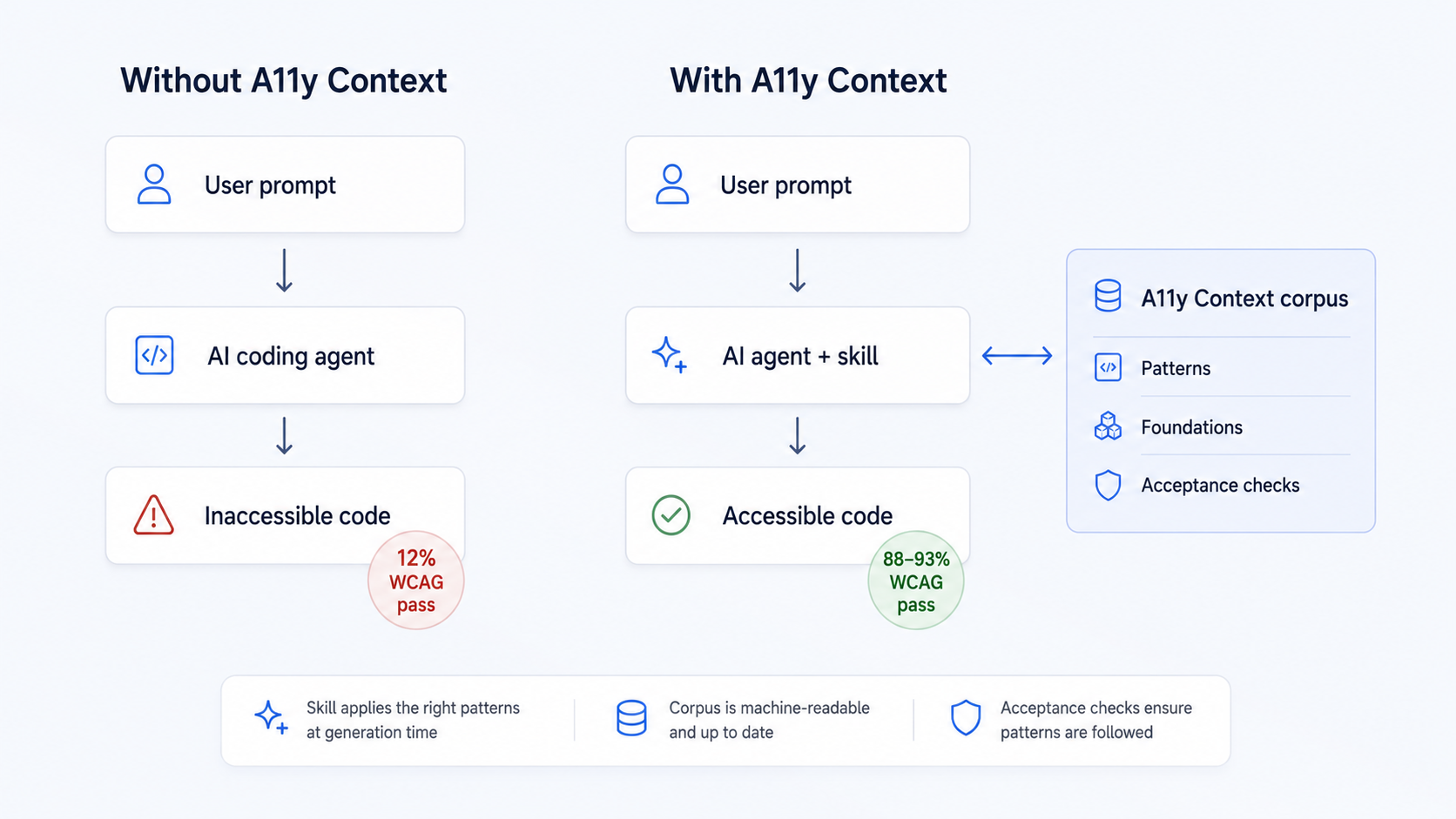
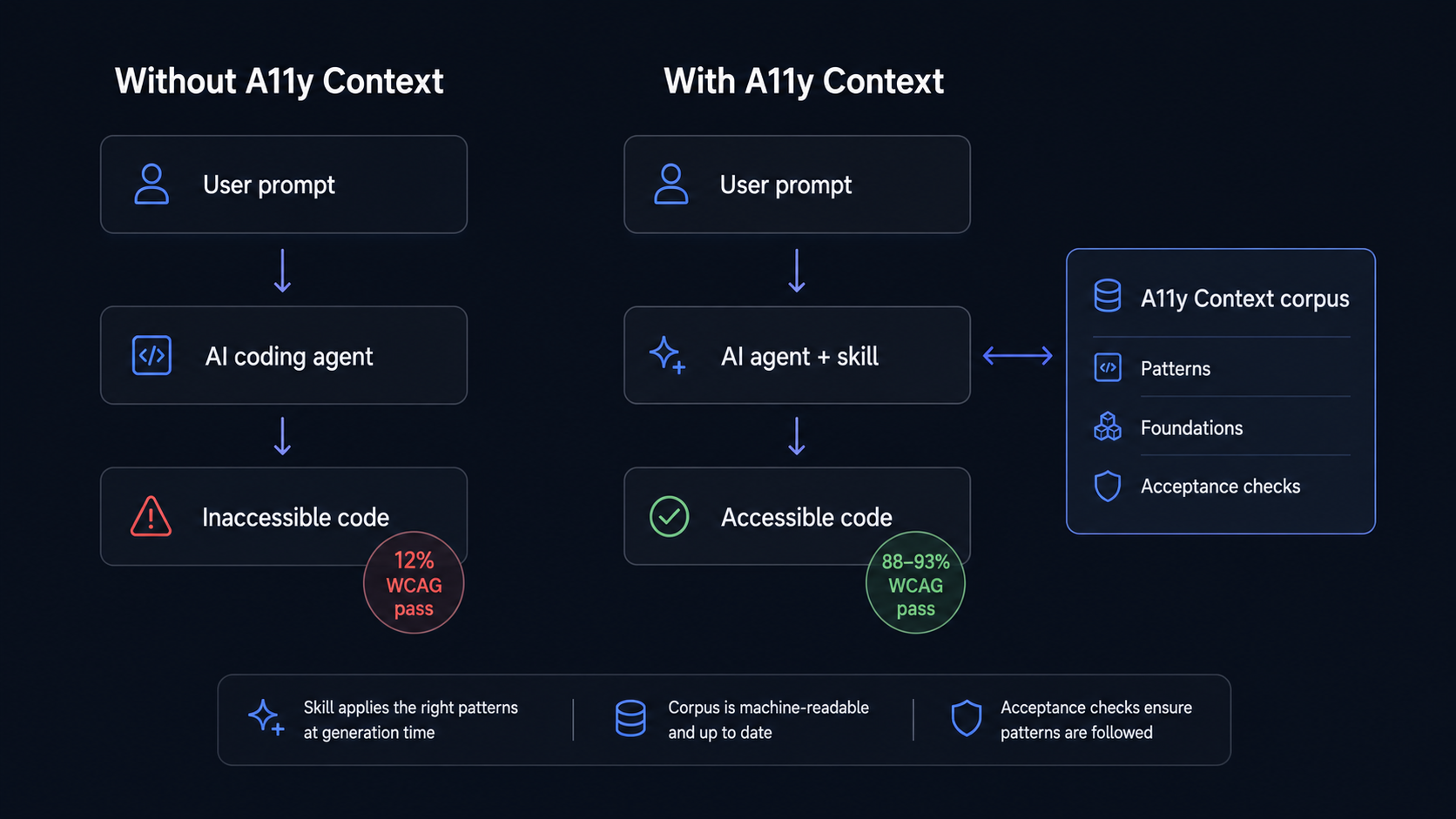
Unassisted, AI-generated UI passes accessibility checks only ~12% of the time across eight frontier models (Microsoft A11y LLM Eval). With A11y Context applied at generation time, code reaches an 88–93% manual pass rate in our experiments.
AI is trained on inaccessible code
LLMs learn front-end patterns from public repositories, developer forums, and crawls of the open web, and that material is overwhelmingly inaccessible. The WebAIM Million study finds detectable WCAG failures on more than 95% of the top million home pages. Tutorial code and demos are written to teach concepts, not to pass compliance checks. The model reproduces what it learned.
This is why simply asking doesn't work. Microsoft's A11y LLM Eval measured the progression: with no instructions, models passed automated WCAG checks 10–12% of the time on average. Adding "make it accessible" to the prompt raised that to 28%. A detailed prompt with a WCAG reference: 46%. The model can't comply with rules it never learned, no matter how firmly you ask.
A general-purpose skill isn't enough
The next instinct is a standing instruction file: a skill or system prompt with an accessibility checklist. Microsoft tested a 300-line accessibility instruction file: 58% average pass rate. Better, still failing.
The reason is structural: accessibility is contextual, not deductive. Take one "simple" rule: "all images need alt text describing the image." A decorative image needs empty alt text. An image inside a link takes the link's destination as its description. An icon inside a labeled button must be hidden from assistive technology entirely. A chart needs a long-form text alternative. One rule, four different correct implementations, and that's a mild example. Component behavior is harder still: an accordion's correctness conditions share almost nothing with a carousel's, a modal dialog's, or a channel guide grid's.
Covering that for real requires per-component depth. This corpus gives every component its own specification (roughly 350 lines each), plus global rules for the cross-cutting concerns no component file owns: landmarks, headings, contrast, focus states. No 300-line checklist can hold that.
You can't retrieve all of it, either
Per-component depth creates the opposite problem: the full corpus injected into every session means thousands of lines of context the model must reason over, token cost on every request, and diluted attention on the rules that matter for the task at hand.
The answer is selective retrieval. Before writing code, the agent looks at what it is about to build, identifies the components involved, and retrieves only those patterns — plus the Foundations ruleset, whose per-rule scope (utility, page, layout, component, style) determines which cross-cutting rules apply to the change. A task that builds a product page pulls the collection row, button, and toast patterns; it does not pull the channel guide grid. Per-component depth, without corpus-sized context.
Every pattern page is written to make this work: self-contained, independently retrievable, with selection boundaries (Use When / Do Not Use When) the agent can evaluate without reading the full document.
Why not just fix the output afterward?
Post-generation scanning (linters, CI checks, AI reviewers) has its place, but as the primary intervention it fails four ways:
- Remediation load. Unassisted generation produces dozens of issues per component; someone has to fix all of them.
- Architectural problems are expensive late. A missing focus-management model or a wrong interaction pattern is a rebuild, not a patch.
- Fixes don't know the codebase. Automated remediation operates on the symptom, blind to the design system and conventions around it.
- The intent of the original prompt is lost. Repairs happen without the context the developer gave the generator.
Generation-time guidance prevents what post-hoc tooling can only detect. (The corpus still serves the detection side well; see QA and accessibility testing.)
The evidence
A controlled experiment (48 runs, 9 architecture variants, two-round e-commerce build tasks, no mention of accessibility in any prompt) measured what this system actually does:
- Manual accessibility pass rate: 63% → 88–93% (p < 0.001)
- Axe-core violations: 17 per run → 1–5 (70–95% reduction, p < 0.02)
- The system occasionally outperformed its own documentation: one run produced a two-layer focus indicator design better than the documented pattern, now incorporated into Foundations
The 12% figure above is Microsoft's cross-model automated baseline; in our own controlled experiment the manual pass rate rose from 63% to 88–93%.
The cost is real and worth stating: guided runs took roughly 2× the development time of unassisted runs. The trade is dozens of accessibility defects that never get written.